| Name of Post: |
Bihar Bhumi Bhu-Lagaan Pay online 2026
|
| Post Date / Update: | 09 Jun 2026 | 03:58:05 PM |
| Short Information: |
बिहार में भूमि (जमीन) का खाता और खसरा ऑनलाइन देखने के लिए बिहार सरकार के राजस्व एवं भूमि सुधार विभाग की का उपयोग किया जाता है। इसके लिए आपको जिला, अंचल, मौजा (गाँव) का नाम और खाता नंबर/रैयत का नाम पता होना चाहिए
|
Revenue and Land Reforms Department, Government of Bihar
Bihar Bhumi Bhu-Lagaan Pay Online Apply 2026
Bihar Bhumi Advt No. : 2026 : Short Details of Notification
|
Important Dates
- Application Start Date :Start
- Last Date for Apply Online :Notify Soon
- Payments Issue Date:Notify Soon
|
Application Fee
- General / OBC / EWS : 0/-
- SC / ST / PH: 0/-
- Pay the Examination Fee Through Online Fee Mode Debit
- Card, Credit Card, Net Banking Only.
|
| |
Bihar Bhumi Bhu-Lagaan Pay Online Apply Form 2026
|
|
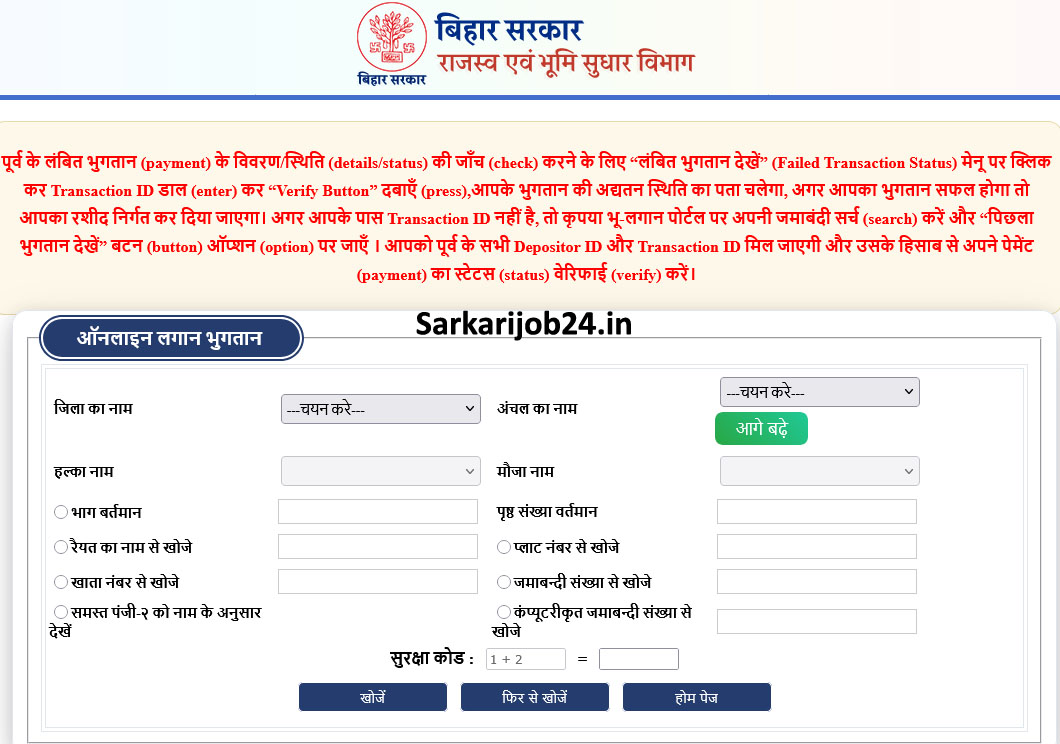
पूर्व के लंबित भुगतान (payment) के विवरण/स्थिति (details/status) की जाँच (check) करने के लिए “लंबित भुगतान देखें”(Failed Transaction Status)
मेनू पर क्लिक कर Transaction ID डाल (enter) कर “Verify Button” दबाएँ (press),आपके भुगतान की अद्यतन स्थिति का पता चलेगा, अगर आपका
भुगतान सफल होगा तो आपका रशीद निर्गत कर दिया जाएगा। अगर आपके पास Transaction ID नहीं है, तो कृपया भू-लगान पोर्टल पर अपनी
जमाबंदी सर्च (search) करें और “पिछला भुगतान देखें” बटन (button) ऑप्शन (option) पर जाएँ । आपको पूर्व के सभी Depositor ID और
Transaction ID मिल जाएगी और उसके हिसाब से अपने पेमेंट (payment) का स्टेटस (status) वेरिफाई (verify) करें।
- भाग बर्तमान और पृष्ठ संख्या से
- रैयत के नाम से खोजें
- खाता नंबर से खोजें
- प्लॉट नंबर से खोजें
- जमाबंदी संख्या से खोजें
- समस्त पंजी-२ को नाम के अनुसार देखें
|
|
|
How to Fill Bhu-Lagaan Pay Online Apply Form 2026
- On the homepage, you will find the 'Online Bhulagan' (or 'Pay Land Tax Online') option;
- click on it. Enter land details: A form will open on the next page where you must accurately
- enter the following information: District and Anchal names; Halka and Mauja; and 'Bhag Vartman' (Current Volume) and
- 'Prishth Sankhya Vartman' (Current Page Number). (If you do not know the 'Bhag Vartman' and 'Page Number', y
- ou can find them by using the 'View Jamabandi Register' option on the homepage and entering your Khata/Khesra number or name).
- View outstanding dues and pay: Upon submitting the details, the complete Jamabandi records for your land and the outstanding
- land tax amount will appear on the screen. Next, click on 'Pay Online'. You can complete the payment using net banking, a debit card,
- a credit card, or UPI. 5. Download the receipt: An 'e-Receipt' will be generated after a successful payment. Download it and keep a printed copy safe for future reference.
- Before Submit the Application Form Must Check the Preview and All Column Carefully.
- If Candidate Required to Paying the Application Fee Must Submit. If You have Not the Required Application Fees Your Form is Not Completed.
- Take A Print Out of Final Submitted Form.
|
|
Interested Candidates Can Read the Full Notification Before Apply Online.
|
Download Mobile Apps for the Latest Updates
|
Bhu-Lagaan Pay
|
|
Failed Payment Verify Status
|
|
Application Status
|
|
Join Sarkarijob24.in Channel
|
|
Official Website
|
|
Official Website Sarkarijob24.in
|
|
|
.png)